
Flagship Case Study
Agentic AI Production Harness
A runnable full-stack AI reference project for the layer most agent demos are missing: product UX, workflow control, retrieval grounding, typed tool execution, human approval, evaluation, traces, and operational readiness.
Problem
Agent demos often work in controlled paths but fail when real users introduce ambiguity, stale context, risky actions, partial inputs, tool failures, and production constraints. This harness shows how to make those risks visible and manageable.
Build status
The project now includes a dependency-free runnable Node demo, a golden workflow eval suite, a tool contract schema, trace artifacts, and a visual trace mock. Connecting the mock to generated traces is the next upgrade.
Run it locally
cd examples/agentic-ai-production-harness
npm run demo
npm run eval
Trace viewer mock
What the harness makes visible
Intent router
tool_request_with_human_approval
Detected a state-changing support action that requires review.
Retriever
2 policy documents found
Refund Policy and Account Cancellation Policy were used as grounding evidence.
Tool contract validation
valid high-risk action
JSON schema validated the action type, customer id, reason, evidence ids, and approval requirement.
Approval gate
waiting for reviewer
The workflow pauses before account cancellation or refund execution.
Eval signals
pass with review
Groundedness, tool success, approval routing, latency, and cost are captured in the trace.
Production AI system map
How I connect product, data, agents, and release readiness
A production AI feature is not one model call. It is a workflow that needs trust, control, evaluation, and observability.
Product request
User intent, workflow context, permissions, and success criteria.
UX + state layer
Copilot screens, review queues, progress states, corrections, and trust signals.
Workflow orchestration
APIs, auth, queues, state machines, retries, and human approval paths.
RAG + data trust
Documents, metadata, retrieval, citations, freshness, and permission filters.
Model + agent control
LLM calls, tool contracts, routing, fallback logic, and bounded agent actions.
Eval + observability
Traces, prompt versions, golden workflows, cost, latency, and release gates.
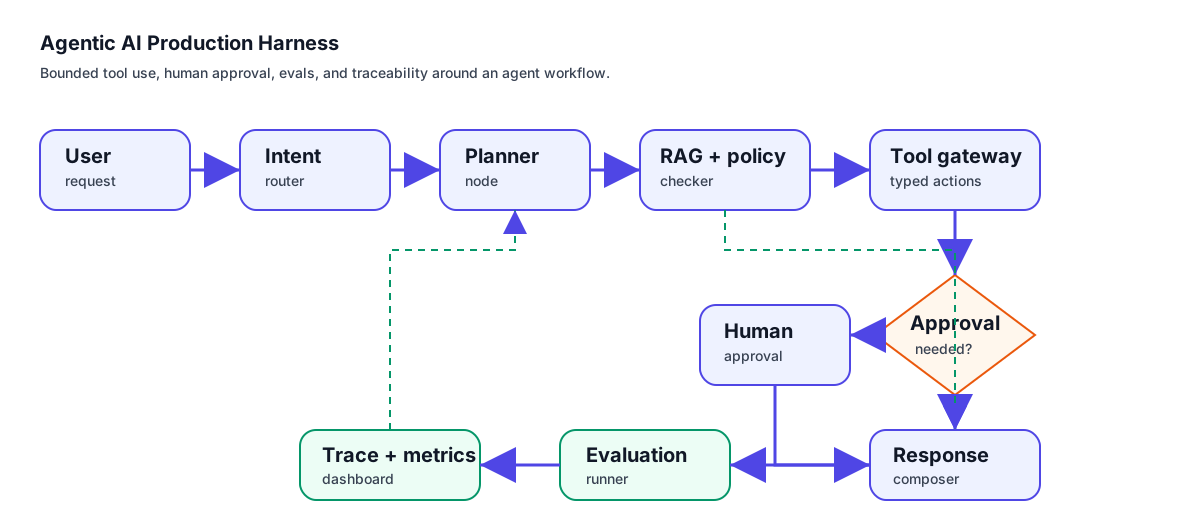
This draw.io-backed SVG shows the production request path from user request to intent routing, planning, retrieval, tool control, approval, response composition, evaluation, and tracing.
Inspectable artifacts
These repository artifacts make the case study inspectable without pretending the full UI is finished.
Runnable demo README
Run npm run demo or npm run eval to inspect workflow routing, evidence retrieval, approval gates, traces, and eval output.
Golden workflow eval dataset
Sample scenarios for policy questions, tool approval, stale documents, and ambiguous requests.
Tool contract schema
JSON schema for validating state-changing support actions before execution.
Sample trace
Example trace showing routing, retrieval, tool validation, approval gate, latency, cost, and quality signals.
Request intake and intent router
Classifies whether the user needs retrieval, tool execution, human review, or a normal response path.
Planner node
Breaks the task into controlled steps and records assumptions before any tool is called.
Retriever and policy checker
Fetches grounded context, checks document freshness, validates access rules, and prepares citations.
Tool execution gateway
Runs only approved tools with typed inputs, output validation, audit logs, and fallback handling.
Human approval checkpoint
Routes risky or irreversible actions to a reviewer instead of allowing fully autonomous execution.
Evaluation and trace layer
Scores groundedness, task completion, latency, cost, tool-call success, and failure categories.
Mock product states
- •User request intake with task type and risk label
- •Retrieved evidence panel with source, freshness, and citation status
- •Tool approval queue for risky or irreversible actions
- •Trace timeline showing prompt version, retrieved context, tool calls, latency, and cost
Failure modes covered
- •Wrong intent route
- •Stale retrieved document
- •Risky tool request
- •Malformed tool output
- •Prompt regression
- •Latency or cost spike
Evaluation table
| Scenario | Expected behavior | Signal |
|---|---|---|
| Policy question with fresh source | Answer with citation and freshness note | Groundedness + citation coverage |
| Request needs external tool action | Route through tool contract and approval rule | Tool-call success + approval rate |
| Stale retrieved document | Warn or fallback instead of confident answer | Freshness handling |
| Ambiguous user request | Ask clarification before planning actions | Workflow completion quality |
Implementation roadmap
- Connect the visual trace viewer to generated demo output.
- Add human approval UI mock for risky tool requests.
- Add a small retrieval corpus with document freshness and permission examples.
- Add demo GIF and screenshots for the portfolio case study page.
- Publish companion build notes explaining the implementation decisions.